Huawei MatePad Air 2025: A trendy productivity companion for young people
For new entrants to the workplace and those studying and researching, commuting to work on the subway every day, carrying a heavy laptop in their hands, not only causes shoulder pain, but also requires starting various documents from scratch when they arrive at the office. The PPT that needs to be made temporarily is stuck in the typesetting step, and the efficiency is so low that it drives people crazy.
These “light office pain points” have long become invisible stumbling blocks to daily efficiency, especially those moments when you need to record inspiration at any time and organize reports quickly, traditional equipment often lags behind.
This year’s Double Eleven, Huawei provided a targeted solution: Huawei MatePad Air 2025 model, with its “5.9mm thin and light body + Harmony AI full-scene empowerment”, not only solved the problem of commuting portability, but also doubled the efficiency of light office work. With multiple discounts, it has become the first choice for newcomers in the workplace and students.
5.9mm ultra-thin body: no burden on commuting
For new professionals who have to squeeze into the subway and run around the site every day, “device portability” is the most important point, which just falls precisely into the comfort zone of Huawei MatePad Air 2025.
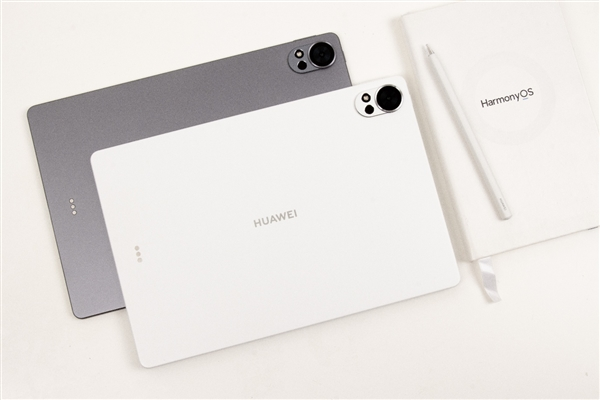
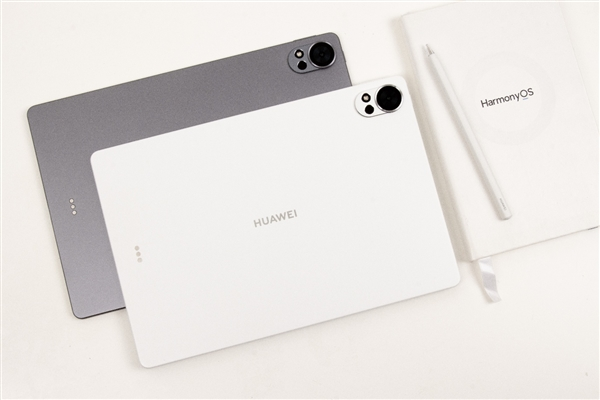
Extremely thin and light, you can carry it with you: the body is as thin as 5.9mm and weighs about 555g. It is effortless to hold it in one hand to take notes and look up information, and you can completely say goodbye to the trouble of “pressing your shoulders” with traditional notebooks.
Trendy appearance, adaptable to multiple scenarios: It adopts an all-metal integrated body design with a delicate matte effect, with outstanding texture. It is available in four colors: smoky gray, feather sand white, cherry pink, and grass green. Whether you are presenting a plan in the conference room or organizing documents in the library, you can take into account professional design and personal style.
The Huawei MatePad Air 2025 model is equipped with an ultra-clear eye-protection cloud-clear soft light screen. The 144Hz high refresh rate makes sliding documents and switching pages smoother and smoother. The peak brightness of 1000nits allows you to clearly see the screen content even in strong outdoor light.
Most importantly, the high brightness and anti-glare feature make your eyes comfortable even when you read documents or browse materials for a long time. The text on the screen is still clearly visible under strong light in the classroom or office during the day. Combined with the low blue light design, it can reduce eye fatigue from long-term use, making commuting, watching TV shows, and modifying plans more comfortable.
Hongmeng AI + Xiaoyi Assistant transforms into a smart office manager
Being light and portable is just the basic advantage of Huawei MatePad Air 2025. The AI capabilities of Hongmeng system are even more powerful for work and study efficiency, which can greatly improve efficiency.
The built-in Xiaoyi assistant in Huawei MatePad Air 2025 is on standby at any time and supports AI functions such as document processing and summary generation. After a meeting, circle the recording clips and Xiaoyi can quickly generate a structured summary, automatically marking key content and to-do items, eliminating the need to organize lengthy recordings sentence by sentence.
When writing a report, you only need to say “generate data chart” to Xiaoyi, and it can automatically extract document data and generate intuitive bar charts and line charts, eliminating the tediousness of manually making charts.
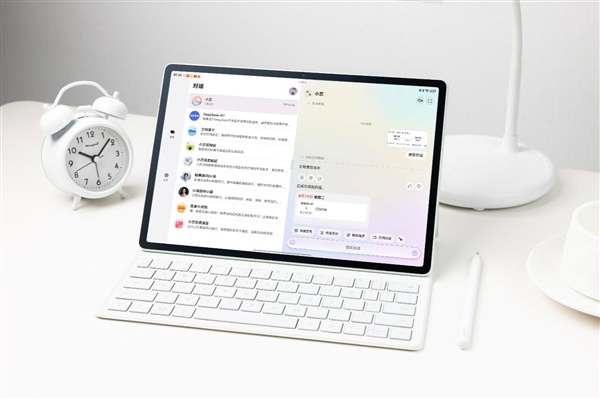
When paired with Huawei M-Pencil Pro, you can also open the “Magic World”. Just click the smart button at the end of the pen to wake up Xiaoyi, pinch the pen body lightly to pop up the global wave wheel, circle the text to translate and search, and the operation is flexible.
In addition, various built-in applications of Huawei MatePad Air 2025 have also added AI capabilities.
Huawei Notes: Supports real-time AI handwriting adjustment, automatically adjusting pen strokes and correcting font tilt in handwritten notes, and exporting PDFs comparable to printed drafts. When encountering mathematical formulas, AI can automatically recognize and convert them into editable formats, making students and researchers more efficient in organizing exercises and writing papers.
WPS Office: The one-click PPT generation function is a “lifesaver.” Enter a text outline, and the AI will automatically match the template and layout to quickly produce a professional PPT.
Jianying Professional Edition: AI smart subtitles can automatically recognize voice and generate text, and the intelligent tapping function can match the rhythm of background music to edit the picture, so you can easily produce films with zero basic knowledge.
HarmonyOS Ecosystem Interconnection: Seamless data flow and easy collaboration among multiple devices
As a core device of the HarmonyOS ecosystem, the Huawei MatePad Air 2025 model can seamlessly collaborate with HarmonyOS devices such as mobile phones and computers.
Multi-screen collaboration: After projecting the phone screen to the tablet, you can edit mobile documents and call mobile photo albums directly on the tablet. For example, when writing a report, you can directly drag and drop on-site photos from the phone to insert them.
Super Transfer Station: Drag text or saved images copied from your phone into the “Transfer Station” and they’ll be instantly accessible on your tablet. For example, if you receive a meeting address via WeChat, drag it into the Transfer Station and open a map search on your tablet for direct navigation.
Cross-device collaboration: Huawei Notes supports cross-device synchronization, so you can continue editing unfinished notes on your tablet on your computer; WPS Office real-time sharing eliminates the need to repeatedly transfer files when collaborating as changes are synchronized instantly.
In short, for young professionals and those in academic research, choosing the Huawei MatePad Air 2025 is choosing an efficient, portable, and collaborative office solution. Take advantage of the Double 11 discounts and turn your commute into a productivity boost, using HarmonyOS AI to create a more relaxed work experience.
This year’s Singles’ Day (Singles’ Day) shopping festival, the Huawei MatePad Air 2025 is offering multiple discounts. From October 9th to November 14th, the Huawei MatePad Air 2025 is available for a limited time with a 15% government subsidy, starting at just 2,299 yuan. Education discounts are available online and offline, and online purchases can also enjoy interest-free installment payments.

Kazam is Focused on creating and reporting timely content in technology with a special focus on mobile phone technology. Kazam reports, analyzes, and reviews recent trends, news and rumors in mobile phone technology and provides the best possible insights to enhance your experience and knowledge.